
Feature Focus: Replace Existing Documents

The new Bundledocs App is here. For those that missed the announcement, Bundledocs latest release allows users to effortlessly prepare professional document bundles directly from their smartphone or tablet device. Document bundling has never been easier.

But that's not all. Within the new App, Bundledocs have included a number of new features. One of these is the ability to replace any existing file with an updated version. Let's take a look at how this is done.
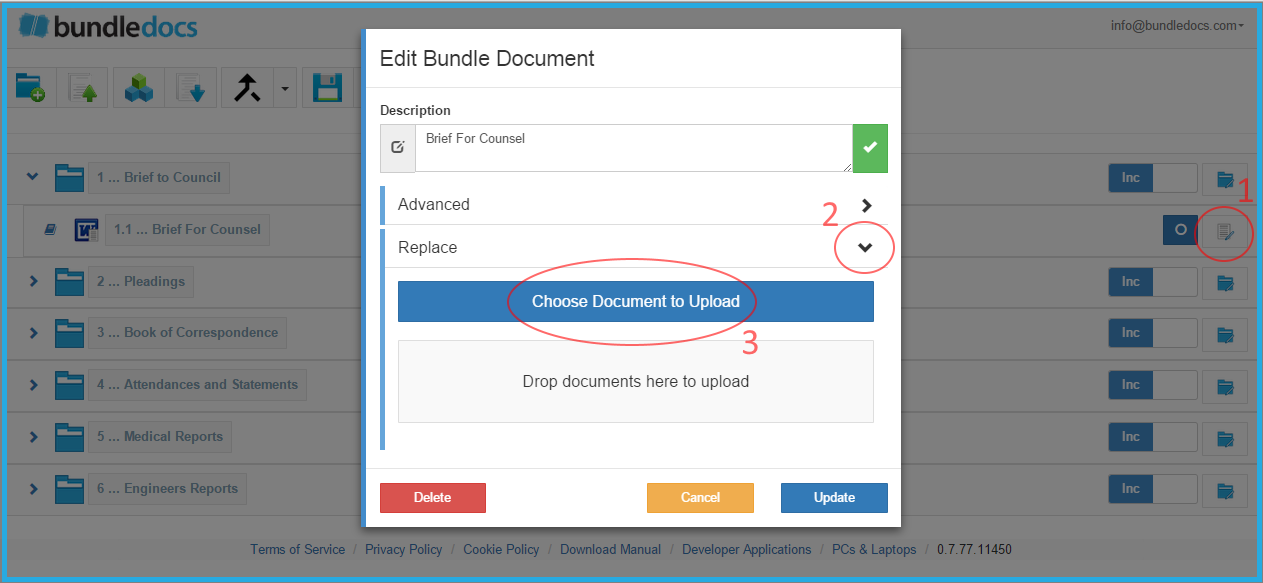
Effortlessly replace files within the new Bundledocs App

Effortlessly replace files within the new Bundledocs App

1. Select 'Edit Details'

2. Expand the 'Replace' section. 

3. Within the 'Replace' section, select 'Choose Document to Upload'. This will enable you to easily replace the current document with a new file. The original file will be immediately removed and replaced with the new file. 

Bundledocs offers users everything they need to create the perfect bundle. Not already a Bundledocs user? No problem. Create your Free 30-Day Trial now with no credit card required and no obligation. 

Try the New Bundledocs App Today

Video: Create Document Bundles on your iPhone, iPad and Android Device

Effortlessly create document bundles on the go. 

This week Bundledocs launched a new app to help users quickly and easily produce professional document bundles straight from their smartphone or tablet device. This is great for any busy legal professional on the go as it means you no longer need to be near your laptop, computer or even in the office. 

Watch our latest video to see the new app in action...

Access our New App Today

Effortlessly Create Court Bundles on your Smartphone or Tablet

The Bundledocs App is here. Now you can create court bundles anywhere. 

Ever needed to quickly amend or update your bundle whilst out of the office. With the new Bundledocs app now you can.  For those that missed the announcement, Bundledocs recently launched a new app that enables legal professionals to create court bundles directly from their smartphone and tablet device. This means you don't have to be in the office or even near a computer to create the perfect court bundle.

Bundledocs on a Desktop Computer

Bundledocs on a Desktop Computer

 
Bundledocs New App is available on any device

Bundledocs New App is available on any device

If you are familiar with Bundledocs and want to utilise our new app, don't worry all the same features you currently use are still here. Let's take a closer look...

Design: Similar to our desktop version, the new Bundledocs app is incredibly intuitive and easy to use. At Bundledocs we are dedicated to helping legal professionals create court bundles with ease and this is reflected in our design. Login today and check it out for yourself.

5 Step Process: Remember with the new Bundledocs app it still only takes 5 steps to create a high quality professional bundle in minutes. Effortlessly create and customise your bundles using the same 5 step process you currently use on your laptop or desktop. 

New App - Same Features: Our app offers the same features and functionality that you are used to. For example: Effortlessly review, make amendments or even produce a complete court bundle straight from your smartphone or tablet device. Producing court bundles has never been easier. 

Register for your Free Trial Today

Get to Know Everything about our New Bundledocs App

Want to learn more about the new Bundledocs app?  Get your questions answered today. 

This week Bundledocs announced that we have developed a new app to further help our users create bundles with ease. In our latest release users can access and create bundles directly from their smartphone or tablet device. For those interested to learn more about bundling on the go, you've come to the right place. 

Whether you need help getting started or you just want to find out everything there is to know about our latest release, our comprehensive user manual has your questions covered. Simply follow these steps to get your copy today. 

Easily Access our Complete Bundledocs App Training Guide

Easily Access our Complete Bundledocs App Training Guide

1. Accessing our new app is simple. Take a look at our recent article 'Access our New Bundledocs App' to see how easy it is to login.

2. Once you've logged into your Bundledocs App account, the home screen will appear (as shown above). From here, simply select 'Download Manual' to download your copy of our Complete Bundledocs App Training Guide. 

Access the Bundledocs App Now

Access our New Bundledocs App

If you missed our recent announcement, Bundledocs recently launched a powerful new app. Our latest release is ideal for any busy legal professional on the move as it enables users to effortlessly create, build, amend or simply access bundles from any device or location. Read it in full: 'Announcement: Bundledocs Launch New App'. 

Following our announcement, let's take a look at how you can access our new app. Simply follow these steps...

Step One: Select the 'Smartphones & Tablets' button

Step One: Select the 'Smartphones & Tablets' button

1. Visit: app.bundledocs.com. If you are new to Bundledocs, simply register for a free 30 day trial account. 

2. Select the 'Smartphones & Tablets' button, as highlighted above.

Simply provide your login detail to launch the new Bundledocs App

Simply provide your login detail to launch the new Bundledocs App

3. Once you have selected the 'Smartphones & Tablets' button, a login screen for our new Bundledocs App will appear. Simply provide your usual login details and the new Bundledocs App will immediately launch. 

Remember, with our new Bundledocs App you can effortlessly create and build briefs from any location and device. Any Questions? Get in touch with our Support team today!

Access the New Bundledocs App