Announcement: Bundledocs Launch New App

Bundledocs Announce New App Launch

Bundledocs Announce New App Launch

Powerful new app enables legal teams to effortlessly build briefs from any location

Wouldn't it be great if there was a way to build bundles while out of the office? Wouldn't it be even better if it were possible to do this from your tablet or smartphone? With Bundledocs now you can!

Bundledocs are pleased to announce that we have developed a new app for our document bundling software. Our latest release will enable users to effortlessly create, build, amend or simply access bundles from any device or location. 

For those that have seen Bundledocs in action you should be aware that building briefs is effortless and collaboration is simple and secure. Now with our latest release, Bundledocs offers you the flexibility to work on bundles regardless of whether you are on your smartphone, tablet, laptop or desktop. This is great for any busy legal professional on the move and ensures you continue to create high quality professional bundles regardless of where you are.

Put a stop to the laborious and time consuming task of creating bundles - book your free online demonstration today!

Free Online Demonstration

Upload Files from Box to Bundledocs with Ease

Bundledocs recently announced our new integration with Box content management service. This new integration helps make the process of creating bundles even easier. With our latest integration, Box users can now quickly and easily upload their files directly into Bundledocs. From there Bundledocs takes over to automatically create a fully indexed, paginated, bates numbered, hyperlinked and bookmarked bundle - ready to print, save or securely share. 

Our new integration with Box makes uploading documents into your bundle simple. Let's take a closer look...

Bundledocs Box Integration

Bundledocs Box Integration

Step One: Select 'Upload' and choose a section to upload your documents into. 

Step Two: Select any files you want to upload into Bundledocs

Step Three: Click the 'Select' button. Your files will upload immediately. 

For a complete overview of this process, make sure to check out our 'Bundledocs Box Integration' video to see it in action. 

Free Bundledocs 30 Day Trial

New Integration - Add Documents from Clio

Bundledocs recently announced a new integration with Clio Practice Management Software. With our seamless integration, Clio users can now effortlessly upload matter files directly from Clio into specific sections of their bundle. Once uploaded a complete bundle can be created in minutes. Document bundling has never been easier!

Want to see how to effortlessly add documents from Clio into your Bundledocs account. Let's take a closer look...

Effortlessly Upload Files from your Clio Account

Step One: Select the 'Upload' button

Step Two: Search your Clio contacts

Step Three: Choose a Contact

Step Four: Choose a Matter

Step Five: Choose your Documents

Step Six: Select the 'Create Documents' button to upload. 

Take a look at our Bundledocs Clio Integration video to see the upload process in action. Not already a Bundledocs user? Set up a trial account today and test it out for yourself! 

Free Bundledocs 30 Day Trial

Effortlessly Upload Files From Worldox to Bundledocs

Bundledocs recently announced a new integration between our document bundling solution and Worldox document management system. If you missed the announcement, in short, our new integration ensures documents are quickly and easily uploaded from Worldox directly into your bundle. Let's see how it works...

Effortlessly Upload Files Directly From Worldox to Bundledocs

Effortlessly Upload Files Directly From Worldox to Bundledocs

Step 1: Select your files. Right click with your mouse. Select 'Send To' - 'Bundledocs'

Step 2: Choose a case. For example 'Peter V Paul'

Step 3: Choose a section. For example 'Pleadings'

Step 4: Upload. Files are immediately uploaded to your Bundledocs account 

Once uploaded, Bundledocs takes over to automatically create a fully indexed, paginated, bates numbered, hyperlinked and bookmarked bundle - ready to print, save or share. Check out our video to see it in action. 

Our latest integration makes the process of creating professional document bundles even easier. For more information, contact support on +353 21 482 6320 or send us a quick email

See It In Action

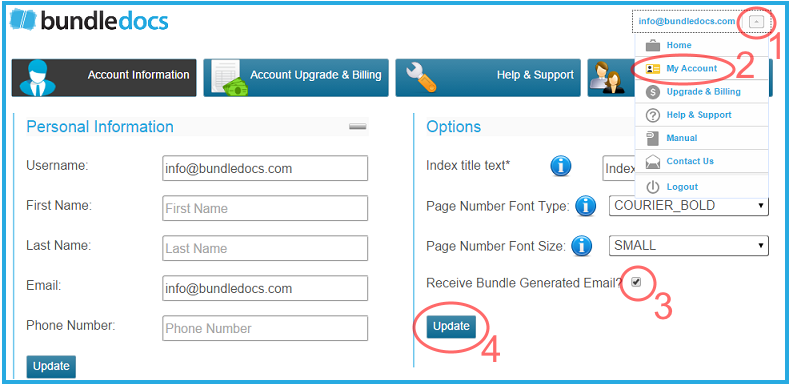
Easily Turn On/Off Bundle Generated Email Notifications

With any bundle generated in Bundledocs, you will automatically receive an email notification informing you that your bundle is ready to be downloaded. However, in some cases you may not want to receive these notifications - especially at times when you are making a number of changes to your bundle. Turning on/off these notifications is simple, just follow the steps outlined below. Remember, you can turn them back on at any time.

Let's take a look at how this can be done...

Easily Turn On/Off Bundle Generated Email Notification

Easily Turn On/Off Bundle Generated Email Notification

1. Select your email in the top right corner.

2. From the dropdown, select 'My Account'.

3. The 'Account Information' section will then appear. Within 'Options' (located on the right of your screen), select the 'Receive Bundle Generated Email' tick box.

4. Select 'Update'

Login to your Account