Join Bundledocs for 12 Days of Christmas - December 2016

Bundledocs Announce 12 Days of Christmas

Bundledocs Announce 12 Days of Christmas

Day One... Here is what's to come!

Christmas is just around the corner and what better way to kick start the festive season than with Bundledocs 12 Days of Christmas.

Our 12 Days of Christmas has something for everyone - whether you are just joining us for the first time or are a long time Bundledocs user. During December, we will be announcing some new feature releases, videos, user guides and much much more. 

Before things wind down for the holiday season, come join Bundledocs for our 12 Days of Christmas. Make sure you don't miss a thing - follow us on: Twitter, LinkedIn and YouTube

Get in Touch

Happy Thanksgiving from Bundledocs

Bundledocs would like to wish you all a very Happy Thanksgiving. 

Need Bundledocs assistance over the holidays? Not to worry. Check out our Help Center to see how you can get in touch. 

Want to catch-up on some Bundledocs reading? Why not check out some of our latest #trainingtip posts. Take a look. 

Happy Holidays!

Need to get in Touch?

Can I remove the Index Page from my Bundle? - Training Tip

Following on from our recent post where we highlighted how to remove the cover/title page from your bundle, today's #trainingtip post will focus on how you can quickly remove the index page from your bundle. 

If you are new to Bundledocs then you may not be aware that Bundledocs automatically generates a complete index - that is fully sectioned, numbered and hyperlinked for easy navigation. Even better, Bundledocs offers a range of customizations so you can adjust your index to suit your requirements. 

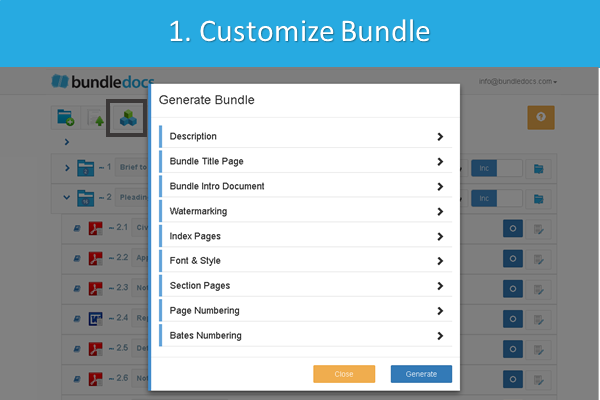
In some cases however you may not require the inclusion of a complete index for your bundle. So, to remove the index page from your bundle simply do the following: 

  1. Select Generate

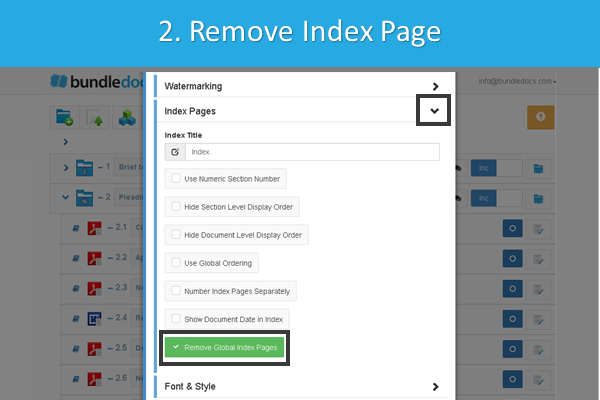
  2. Expand the 'Index Pages' section and select 'Remove Global Index Pages'. 

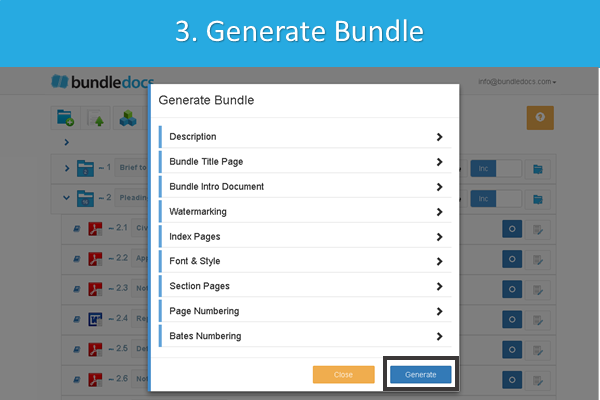
  3. Apply additional customizations (if needed) and generate your bundle.

Give it a go for yourself. If you are new to Bundledocs then make sure to create your free 30 day trial account now. Already using Bundledocs? Then login now and try customizing your bundle today. 

Try for Free & See

Top 5 Reasons your Legal Department Needs Bundledocs

Do you prepare court bundles? Are you on the search for a document bundling solution to help you prepare legal documents for court, tribunals or hearings?

If so, Bundledocs is the solution for you. We have compiled a list of the Top 5 Reasons your Legal Department needs to adopt Bundledocs today. Let's take a closer look...

Top PDF Bundling Tool for Lawyers: In a recent publication by the American Bar Association, Bundledocs was named as one of the key utilities that every lawyer should be using. Check out our announcement. 

Everything you Need to Prepare a Bundle: At Bundledocs we are committed to ensuring we offer the most comprehensive bundling solution on the market today. Our solution is simple and intuitive to use but also powerful to ensure that every bundle produced is prepared precisely, is of high quality and can be provided to the court in good time. Bundledocs automatically handles indexing, paginating, hyperlinking, bookmarking - as well as the ability to work with volumes, handle late insert, create templates and much much more. Find out more. 

It's a Stand-alone Solution: Bundledocs is unique as it is a stand-alone document bundling solution. This means that regardless of what system your use - or even if it is cloud based or stored on-premise, we can work with you. We have already integrated with world leading partners such as NetDocuments, Tikit TFB, Worldox, Clio and Dropbox. Take a look our integration partners. 

Document Bundling on the Go: Unlike other document bundling solutions, Bundledocs offers you the flexibility to not only view bundles but create complete document bundles from any device, any location and at any time. This is great for busy lawyers or legal professionals on the move and means you are no longer tied to the office. Read our latest post for more. 

Multi-User Collaboration: Need to collaboratively work on bundles? No problem. Bundledocs will transform how you prepare bundles. Collaboratively work with colleagues or third parties such as Barristers. With a range of collaborative solutions available producing bundles will never be the same again. 


Put an end to your document bundling worries. Get in touch with the Bundledocs team today to arrange your FREE online demonstration and FREE trial

Book a Free Online Demo

Can I remove the Title Page from my Bundle? - Training Tip

In today's #trainingtip post we will take a look at how you can remove a title page or cover page from your bundle. If you are interested to see how, then let's take a closer look...


Is it possible to remove the cover page from my Bundledocs bundle?
— Free Trial User

At Bundledocs we are committed to providing you with the tools needed to prepare high quality professional bundles every time. When it comes to customizing your bundle, you have complete control and can choose options that suit your needs and requirements. 

If you have taken a look at Bundeldocs for yourself (we offer a free 30 day trial) then you may be aware that Bundledocs allows you to use our automatically generated title page or alternatively, to upload your own custom title page. But that's not all. Now you have the option to remove the Title Page entirely from your bundle. Take a look at how it's done...

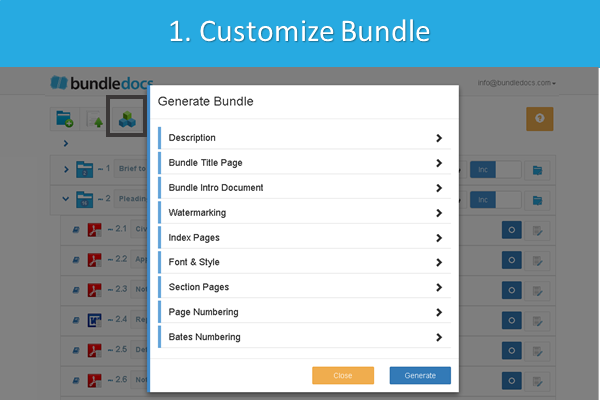
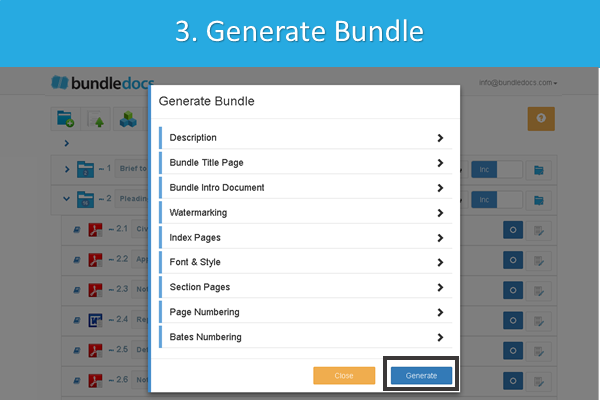
1. Select Generate. 

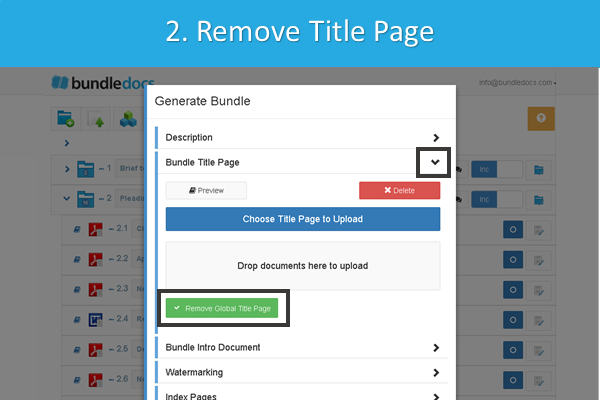
2. Expand the 'Bundle Title Page' section and select the option 'Remove Global Title Page'.

3. Apply additional customizations (if needed) and generate your bundle.

This will remove the Title Page from your generated bundle. Need to include a cover page again at another time? No problem. Bundledocs is flexible and allows you to make as many changes, amendments and generate your bundle as many times as needed.

Give it a go for yourself. If you are new to Bundledocs then make sure to create your free 30 day trial account now. Already using Bundledocs? Then login now and try customizing your bundle today. 

Try for Free & See