Upload from OneDrive to Bundledocs - Video

Bundledocs are delighted to announce our latest integration with Microsoft OneDrive. 

Our latest integration with OneDrive ensures documents are quickly and easily uploaded into your bundle. Once uploaded, Bundledocs takes over to automatically create a fully indexed, paginated, bates numbered, hyperlinked and bookmarked bundle. The completed bundle only takes 5 steps to prepare and is then ready to print, save or share. 

Even better, as Bundledocs is also a cloud based solution you can easily access and produce bundles at any time, any location and from any device. Check out our video to see Bundledocs in action! 
Try for Free & See

Integrate with Bundledocs Unique Document Bundling Solution

It's Integrations Month at Bundledocs

At Bundledocs we are dedicated to helping you create professional bundles with ease. As a stand-alone solution, Bundledocs have partnered and developed integrations with some of the world's leading systems. This means that regardless of what case management, document management or file storage system you use, Bundledocs is available to you. 

With our powerful integrations (which are all available for free!) you can seamlessly and effortlessly access and upload your files directly into Bundledocs. This can help save significant amounts of time, money and effort when preparing bundles. 

Better still... Did you know Bundledocs is available both as a cloud solution and a local on-premise solution? Making the switch has never been easier. 

For the month of July we will be highlighting some of our unique integrations, as well as announcing some new partnerships. Make sure to follow us on Twitter, Facebook, Linkedin and YouTube to keep up to date with the latest. 

Can't wait? Get in touch with our dedicated team today and see if we currently integrate with your solution. 

Find Out More

Make a Bundle Private from Groups in Bundledocs - Training Tip

Did you know it is possible to make specific bundles private from groups within Bundledocs? If not, then you've come to the right place. 

Within our recent post 'Work Collaboratively in Groups with Bundledocs' we released a new video highlighting our groups feature - from the setup of groups to managing group members. Following on from this we will take a look at how to make a single (or multiple) bundles private from group members within Bundledocs. 

It only take a few steps to make a bundle private from other group members. Don't worry you can easily share your bundles again at a later stage if needed. 

How do I make a bundle private from group members in Bundledocs?

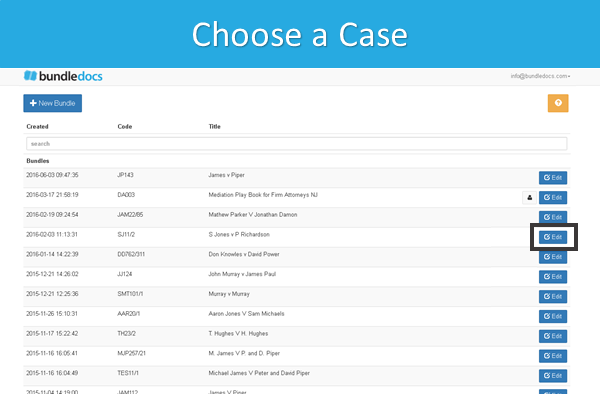
1. Choose a Case. Select the 'Edit' button to edit the case details. 

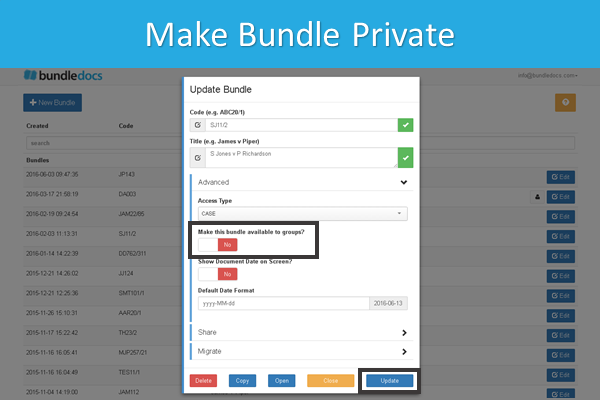
2. Make Bundle Private. Within the 'Advanced' section simply change the settings for 'Make this bundle available to groups' from 'Yes' to 'No'. Select 'Update' to complete. 

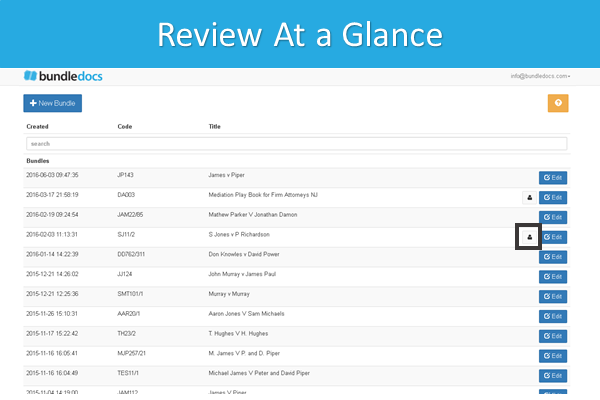
3. Review at a Glance. A grey silhouette will appear next to any case that has been made private making it simple to see any private cases at a glance. 


Interested to learn more? Full details are covered within our manual that is available to download within your account. In addition, our dedicated team are here to help - we are happy to assist with any questions or queries you may have. Get in touch today!

Try for Free & See

Work Collaboratively in Groups with Bundledocs - Video

Collaboratively work together to create bundles with Bundledocs.

Bundledocs provides a number of options for both collaborating and sharing bundles. Thus allowing you to seamlessly work with parties inside and outside your organisation - regardless of their device, location or even time zone. 

If you would like to work collaboratively on a bundle with your colleague then our Groups feature is the solution for you. Easily work together to create bundles by allowing team members to view and edit bundles. This can not only help avoid duplication of work but will ensure that everybody is reading from the same page. 

Check out our video and get familiar with the basics of setting up groups and managing members within Bundledocs. Full details are covered within our manual that is available to download within your account. 

Try for Free & See

Resend Group Invitation to Bundledocs Group Members - Announcement

New Feature Announcement. Bundledocs are delighted to announce that we have added a new enhancement within Groups and Sharing. 

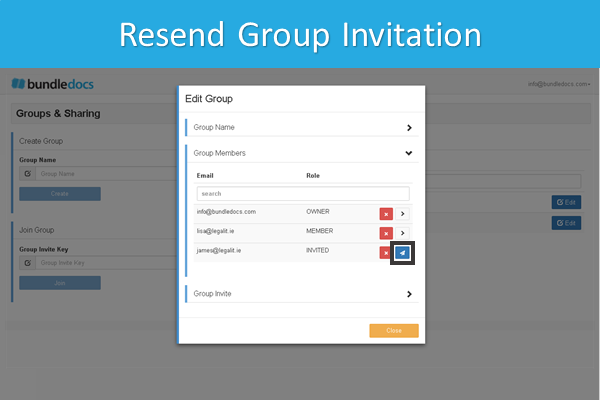
Within our latest release it is now possible to resend an invitation to any user that you have invited to join your group. This is particularly beneficial for group administrators as it enables them to easily re-send invitations to any user that has yet to accept the invitation to join the group. It only takes the click of a button!

Interested to learn more about working in groups with Bundledocs? Make sure to check in on Friday when we will review and highlight working in groups within Bundledocs. 

Can't wait until then? No problem. Our complete manual can be downloaded directly within your Bundledocs account and covers everything there is to know. Find out more today!

Try for Free & See