How to index and paginate documents with Bundledocs?

For most lawyers creating court bundles, briefs or any legal document bundle is a time consuming and often laborious task. With this in mind, Bundledocs has been specifically designed to help legal professionals and legal teams quickly and efficiently create document bundles.

Index_Paginate_Documents_with_Bundledocs.png

In order to create briefs, legal professionals traditionally spend countless hours manually ordering, numbering and indexing documents. This is an incredibly time consuming task and furthermore lacks flexibility and efficiency. For example, if any changes or amendments are required once the bundle is finished, legal professionals would need to re-index, re-order and re-paginate the entire bundle. With Bundledocs brief building software these activities are a thing of the past.


How can I index and paginate documents in Bundledocs?

One of the questions asked most is “How can I index and paginate documents with Bundledocs?” and the answer is simple – Bundledocs does it for you automatically.
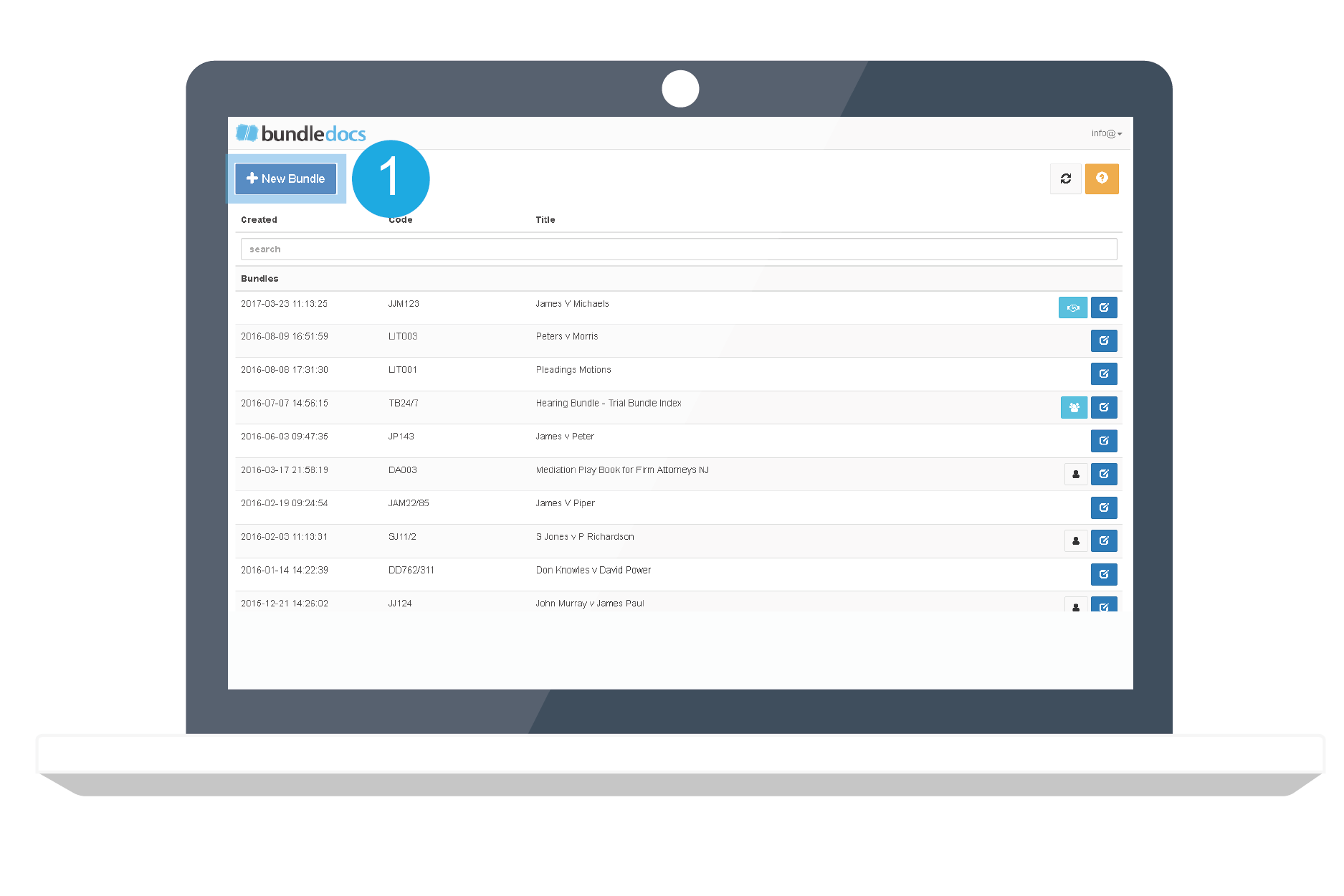
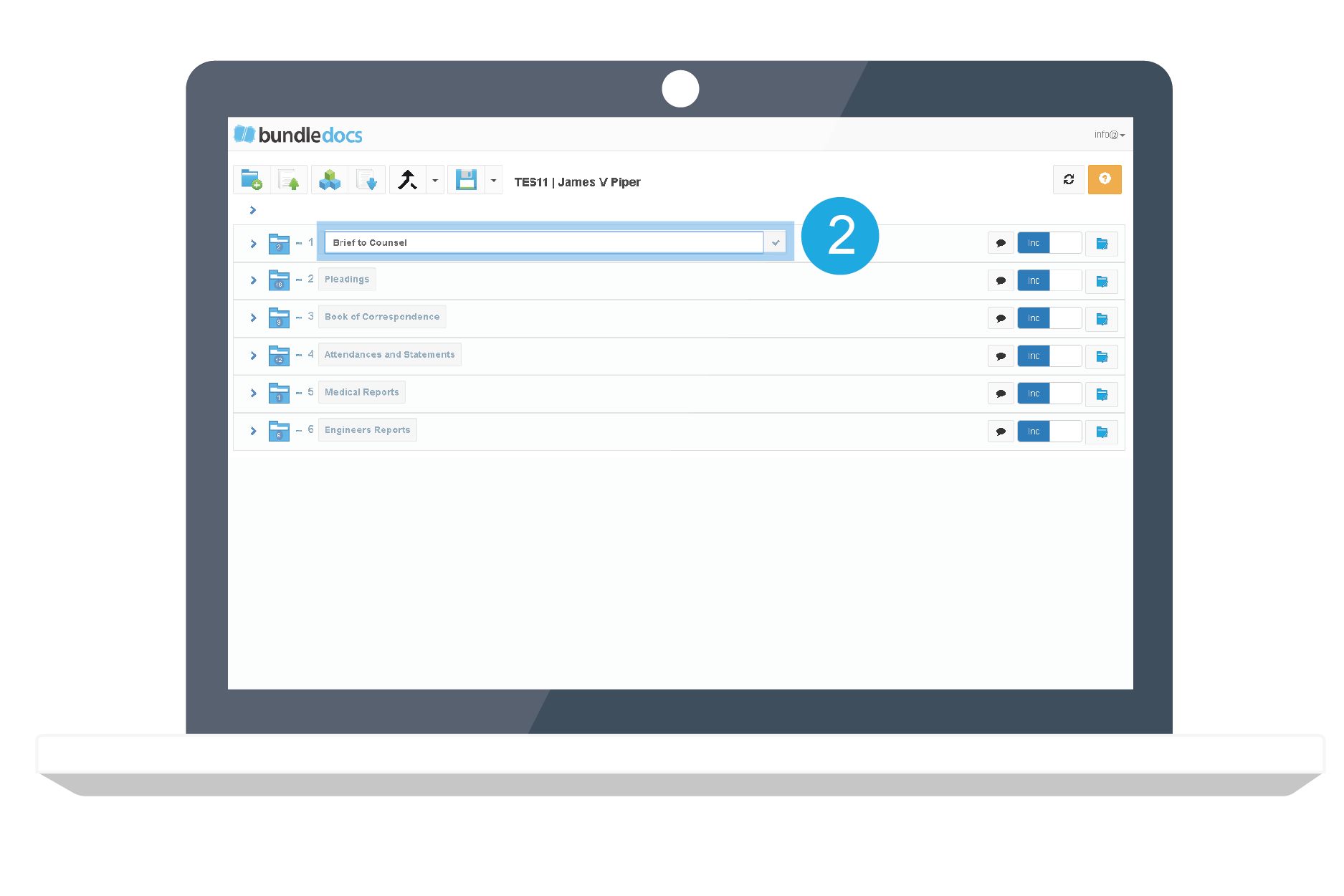
 
  • Step One: Create your Bundle

  • Step Two: Create your Sections (if needed)

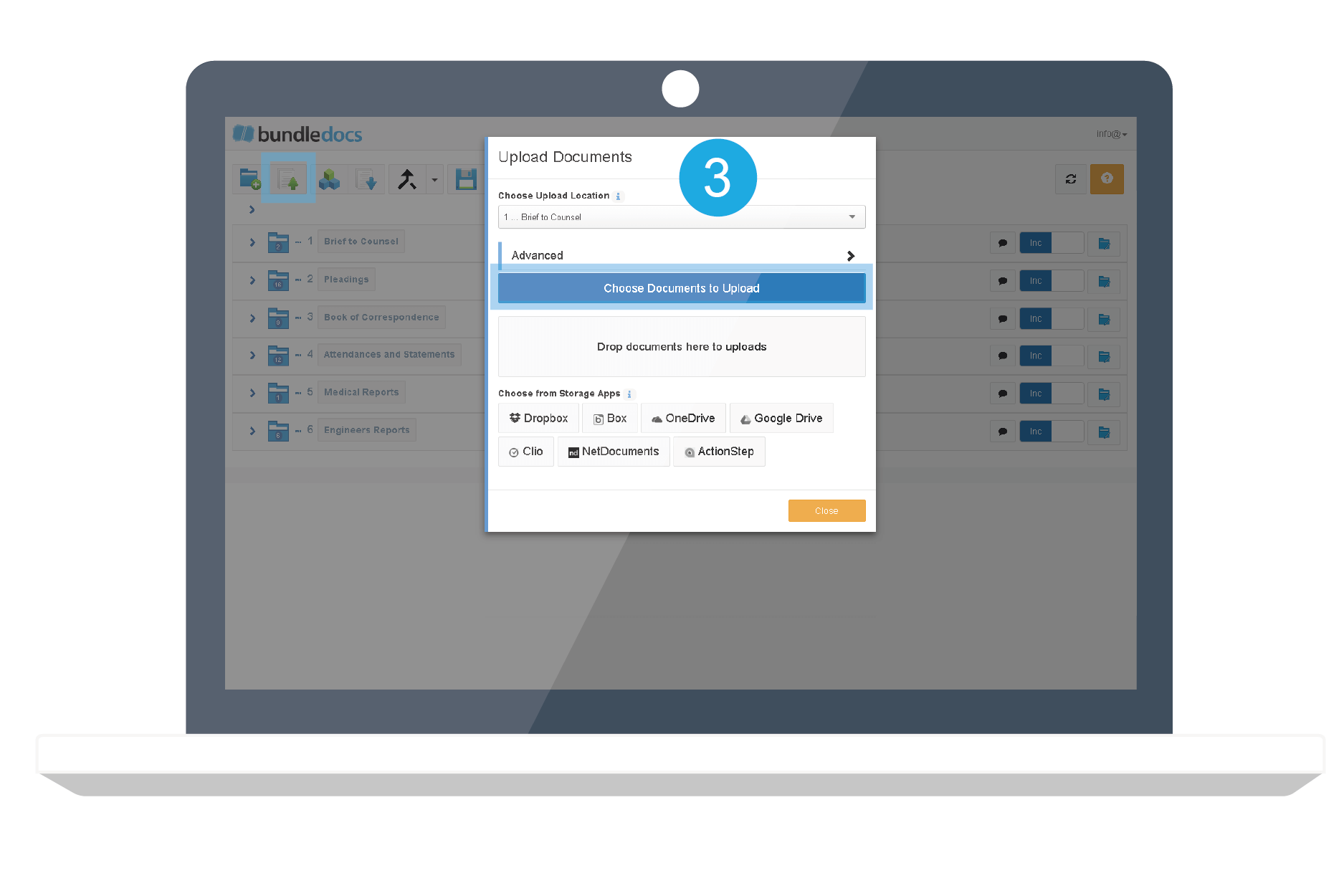
  • Step Three: Upload your Documents 

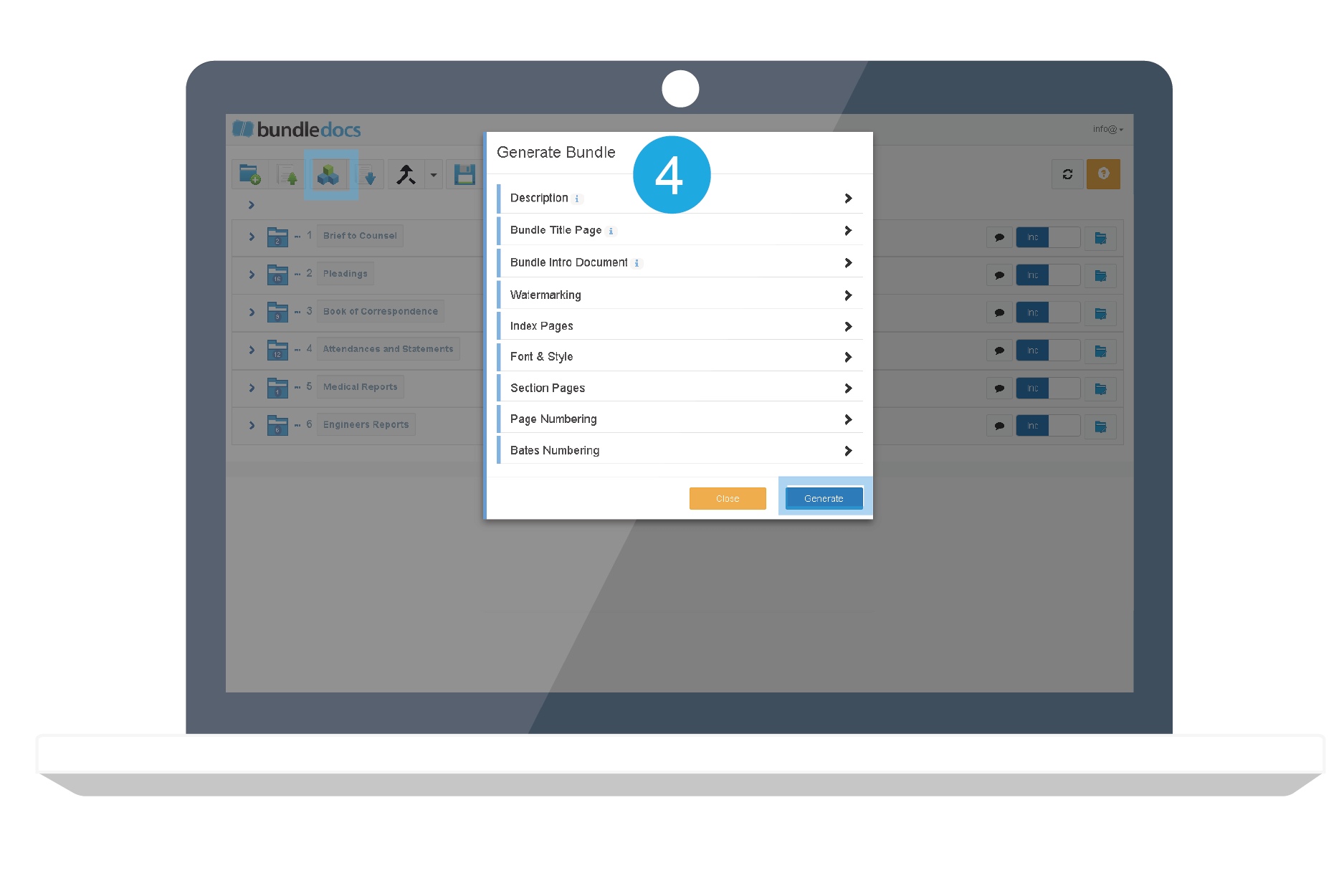
  • Step Four: Customise your Bundle and Click 'Generate'.

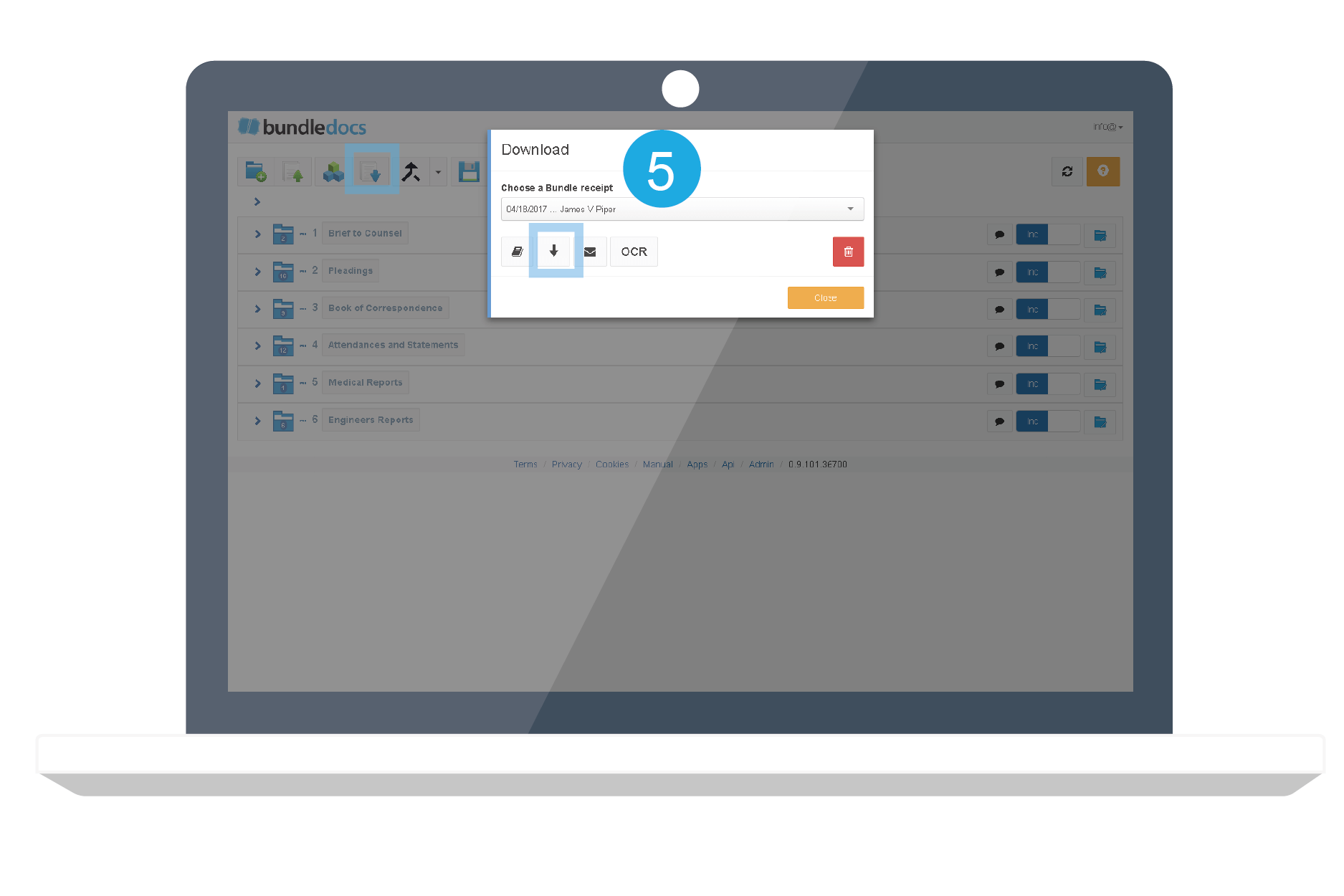
  • Step Five: Download your Indexed and Paginated Bundle 

 
Video: How to Index legal documents


Quick Overview... For any legal professional or team creating document briefs, there is no need to worry about indexing and paginating documents. Users simply upload their documents and position them in the correct order by simply dragging and dropping files. 

Once users are happy with the order of their documents, Bundledocs generates the document brief or “bundle” and will automatically index and paginate your entire document brief. Users are then free to download their completed document brief, which is fully indexed, paginated and ordered. Bundledocs takes the hard work out of indexing and paginating documents.
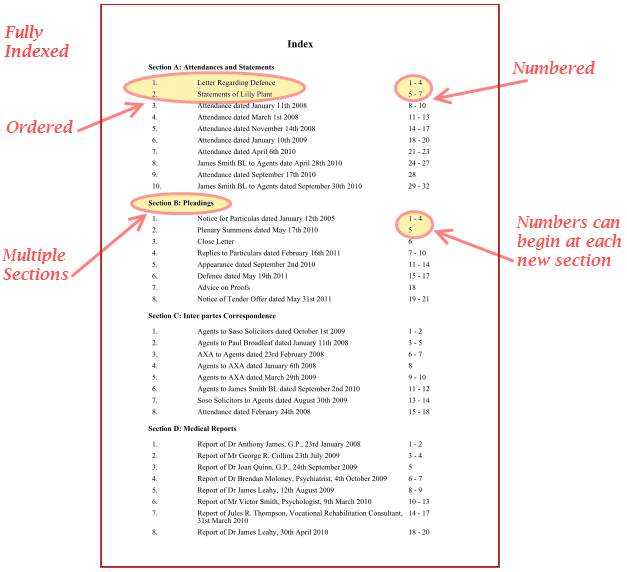
Indexing and Pagination is done with the click of a button with Bundledocs. Check out our sample index page (above). The best bit? You can fully customise your index and page numbering to suit you.

Indexing and Pagination is done with the click of a button with Bundledocs. Check out our sample index page (above). The best bit? You can fully customise your index and page numbering to suit you.


Discover More about Bundledocs Automated Indexing & Pagination

Ready to see it in action? If you’re interested to learn more about Bundledocs and see if it’s a good fit for you. Take a look at our ‘How to index legal documents’ video to see how Bundledocs can effortlessly index and paginate your document bundle. Watch it now!

Want to try Bundledocs brief building software for yourself? No problem. We offer a FREE trial account so you can see how Bundledocs can quickly and easily index and paginate your documents. Create your free trial today!


Try for Free & See

Legal Collaboration and Software as a Service

FeaturesGroups2.PNG

Within the legal sector collaboration plays a key role for most lawyers, whether it exists between colleagues, clients or opposing counsel. However, as new technologies and software continue to change the way firms conduct business, these changes are also affecting how lawyers collaborate.

The rise of cloud computing technologies such as software as a service (SaaS) has greatly affected collaboration within the legal sector. In short, software as a service enables users to access software related services through an internet connection. Therefore, rather than relying on desktop software or traditional servers, software is hosted by a third party and can be accessed via an internet connection.

In an article entitled “Practicing Law with SaaS” author Luigi Benetton discussed the view of Tom Mighell, senior counsel and litigation technology support coordinator for Cowles & Thomspons and author of ‘The Lawyer’s Guide to Collaboration Tools and Technologies: Smart Ways to Work Together’. When discussing his experience using online collaborative tools, Mighell stated that, “It was just so much more convenient. There would always be one version of the document. We wouldn’t have to email back and forth and we wouldn’t have multiple copies of thing on different computers.”

For legal professionals, one of the main areas in which sharing information and collaboration are extensively used is creating brief bundles.  As Bundledocs brief building software uses a software-as-a-service model, lawyers have the added advantage of using online collaborative tools to help when creating brief bundles. So how can Bundledocs help lawyers create briefs collaboratively?

1. Work in Groups:

With Bundledocs, lawyers can grant access to other team members allowing them to view and edit briefs. This is particularly relevant when a number of people are working on a case as there is no need to send documents back and forth, cluttering up your inbox.

2. Share Bundles with Third Parties:

Using Bundledocs, lawyers can securely invite third parties to view briefs. For lawyers generating large briefs this is particularly beneficial, as emailing large files can often be problematic.

3. 24/7 Access from Anywhere:

With Bundledocs, lawyers can access their brief from any device with an internet connection, at anytime 24/7 and from any location. This is particularly useful for legal teams working on a case from different offices or even countries, as Bundledocs enables users to work on briefs regardless of time or location.

If you have any questions about Bundledocs brief building software or would like to avail of our free online demo, please do not hesitate to contact us via our email or by calling +353 (0)21 482 6320.

Find Out More About Bundledocs

Learn More about Bundledocs Brief Building Software

Need help creating the perfect document brief?

Using the latest technology, Bundledocs brief building software has been specifically designed to help legal professionals and legal teams quickly and effectively create the perfect document brief.

Our innovative software makes the process of building briefs simple as it automates the most time consuming tasks. Bundledocs automatically creates an index for the entire brief, numbers each page and produces a fully bookmarked PDF document brief.

Don’t believe us? Take our Top 10 Features tour now.

We have recently updated our website and have created a list of our Top 10 Bundledocs Features. These can be accessed through the features page or by simply clicking on the links listed below. 

Bundledocs Brief Building Software Top 10 Features include:

1.   Automatically Generates your Index

2.   Automatically Numbers your Documents

3.   Upload any Type of Document

4.   No pages or section limits

5.   Making changes is simple

6.   Upload Unlimited documents and download unlimited bundles

7.   Invite 3rd parties to view a bundle

8.   Work & Collaborate in Groups

9.   Index is automatically Bookmarked

10. Available Anywhere 24/7

If you have any questions about Bundledocs brief building software or would like to avail of our free online demo, please do not hesitate to contact us via our email or by calling +353 (0)21 482 6320.

Learn More Now

Why should Smaller Firms adopt Software as a Service?

A recent Law.com article entitled “It’s time for Smaller Firms to Question BigLaw Technology” identified the need for smaller law firms to question following larger firms lead when considering legal technology and innovation.

Within the article author William Caraher argues that when compared to larger firms, smaller law firms have a significant advantage when it comes to adopting new technologies. It is believed that smaller firms can adapt to change and are typically more open to new ideas, standards are less rigid and implementation costs are usually lower. Caraher highlights that many “assume the legal culture is pigeonholed into making “lemming” decisions based upon what other firms are doing”. As a result firms should be not be focusing on what other firms within the legal profession are doing but what are other industries doing.

An interview conducted by the Legal IT Professional with Richard Susskind highlighted some important points relating to the adoption of cloud computing within the legal profession.  The article entitled “Richard Susskind about law firm IT management and cloud computing” highlights that many start-up and small law firms can benefit significantly from the software as a service model as it enables them to access legal applications previously only available to larger firms. Addressing the benefits of cloud computing for smaller law firms, Richard Susskind said, “Cloud computing does the thing, it actually puts the data storage, the computing power and the facilities that used to only available to large organisations, and makes them available to small organisations. I think all these firms are absolutely crucial in bringing and driving technology through into the legal profession.”


Find Out More About Bundledocs

Use of Tablet Devices within Enterprises

As tablet devices continue to rise in popularity there has been a significant growth in the use of tablets within enterprises. Vertic.com recently created an interesting infogrpahic which provides an overview of the use of tablet devices and projected future trends in the enterprise tablet industry in the coming years. The infographic highlights that the legal sector will be one of the sectors impacted most in 2012 by tablet devices. In our previous article entitled “Lawyers Using the iPad for Business” we highlighted a report conducted by the American Bar Association, which identified that 20% of lawyers now use a tablet device.

What are your opinions on the use of tablet devices within the legal sector?

Bundledocs_Enterprise_Use_Of_Tablet_Devices.jpg

Source: Vertic.com


Learn More About Bundledocs