How to Create an Index for Legal Documents

For most legal teams, compiling legal brief documents is an essential part of their pre-trial preparation. When compiling a legal brief for court it is imperative that the required rules and requirements are followed. One of the requirements for every legal brief is an index, which should be included at the front of each brief.
How_To_Index_Legal_Documents_with_Bundledocs.png

Automatically Create an Index with Bundledocs

On the hunt for a solution to help you create a professional your index page easily? Then we're here to help. We created Bundledocs to do just that. Help lawyers and legal professionals create indexed bundles, binders and booklets from anywhere. 

With Bundledocs brief building software the days of manually creating an index are over. Users simply upload their documents to their unique Bundledocs account, arrange documents in the correct order and Bundledocs will automatically generate a full index. Furthermore, if any changes or amendments are required once the brief has been completed, Bundledocs will automatically generate a new index – at no extra cost.

HOW TO CREATE AN INDEX FOR LEGAL DOCUMENTS - VIDEO

How can Bundledocs automatically create a index for your bundle? It’s all done with the clikc of a single button. Take a look at our video to see it in action...

Unable to view? Head over to our Bundledocs YouTube Channel to see all our videos.


Step One: Create your Bundle

Step Two: Create your Sections (if needed)

Step Three: Upload your Documents 

Step Four: Customise and Generate your Bundle

Step Five: Download your Bundle

 
Ready to give it a try?
 

Indexed Document Created Using Bundledocs - Sample

Want to see what Bundledocs can produce? We’ve included a sample index for you below. No need to worry if this isn’t exactly what you want. We know everyone needs to adhere to court requirements or simply wants to use their own house styles. So Bundledocs offers a range of ways you can customise the look and feel of your index page. We even support Custom Indexing and Templates to make it even more powerful.

Want to know how to create an index for legal documents with Bundledocs? Take a look at a completed Index created that was created automatically using Bundledocs.

Want to know how to create an index for legal documents with Bundledocs? Take a look at a completed Index created that was created automatically using Bundledocs.

Get in touch to request a sample Index

Indexing Legal Documents Made Easy

When it comes to creating an index for legal documents, Bundledocs has you covered. Bundledocs automatically produces a complete index for your bundle, but that’s not all. Check out how else Bundledocs can help you…

Making Changes is Simple: If you need to make changes to your bundle, you simple click one button and Bundledocs will instantly prepare a completely new index. 


Fully Customisable: Your index can be customised to meet your requirements. For example, include a document dates column, choose alternative ordering scheme, hide section and document levels, amend names and headings, set fonts and styles etc.

Late inserts: If you've added documents at the last minute and don't want to re-generate your index, that is not a problem. Simply mark any new documents as late inserts. Bundledocs will then apply an alternative numbering scheme to those newly added documents and the current index will not be affected. 

Hyperlinked Index: Your index page is automatically hyperlinked so you can quickly navigate your bundle. Click and you're there.

Not only that it's automatically bookmarked and fully text searchable to make searching your bundle really simple. 


Save, Print or Share your Bundle: Whether you need to create a physical hard copy bundle or electronic brief, Bundledocs is the solution for you. You can download a PDF copy of your bundle at any time. This can then be saved to your computer, DMS, a CD or USB; emailed or securely shared from Bundledocs; or printed. Your bundle, your choice! 

Share your Index Page: When working with others you can easily share your complete bundle - directly from Bundledocs. We have added a great feature that allows you to generate a copy of your index page only. This can then be easily shared with others - so there's no need to waste paper. 


Bundledocs is unique court bundle software that has been designed to help legal teams easily compile a formatted, indexed and paginated legal document brief. Why not try Bundledocs for yourself? Avail of our FREE trial and see how you can quickly and easily create an index for your legal documents. Create your free trial today!

Try for Free & See!

How will paperless courts affect legal document preparation?

Bundledocs_Legal_Court_Document_Preparation_Software-2.PNG

Traditionally the legal sector has been a largely ‘paper only’ industry, however Lord Justice Jackson warns that the industry could face a compulsory electronic era. According to the Law Society Gazette, speaking at a recent lecture Judge Jackson called for an integrated court IT system. In addition to outlining some key systems, Judge Jackson stated that there is “an overarching need for the civil courts to move from paper systems to electronic systems, just as every other public service has done”.

Check out our recent article ‘Are paperless courts the future for the legal sector?’ which discusses the possibility of a move towards a paperless court, with tablet devices set to replace traditional paper documents within courts.

However, as the legal sector continues to adopt new technologies, it is important to consider what these changes will have on the production of legal documents for court?

Marilyn Stowe, blogger and senior partner in Stowe Family Law, wrote an article for the ‘Solicitors Journal’ in which she discussed a future where digital files will replace court bundles. Within the article Stowe argues the move towards a paperless system could help overcome a number of problems - so the days of carrying heavy lever arch files into court could be a thing of the past.

Stowe suggests that often problems can emerge when contents of the lever arch files are cross-checked only to find that the judge’s bundle is incomplete, empty or may even have gone missing. The result of these discrepancies can mean that the case can be adjourned or delayed as someone runs to photocopy hundreds of papers. The introduction of a paperless court could prove very valuable to lawyers, judges and all parties within the courtroom enabling them to send, receive and view document bundles with minimal effort.

How can Bundledocs help?

Regardless of whether courts use traditional paper bundle or electronic bundles, Bundledocs can help legal professionals quickly and easily create document bundles for court. Bundledocs makes creating bundles easy as it automates the most time consuming tasks such as indexing, numbering, sectioning and even sending your document bundle. Take the hard work out of creating legal document bundles today!

What are your thoughts on paperless courts? Will an electronic system benefit the courtroom?

Easily Create Electronic Bundles

View our Top 10 Features Today!

Take a Look at Our Top Features

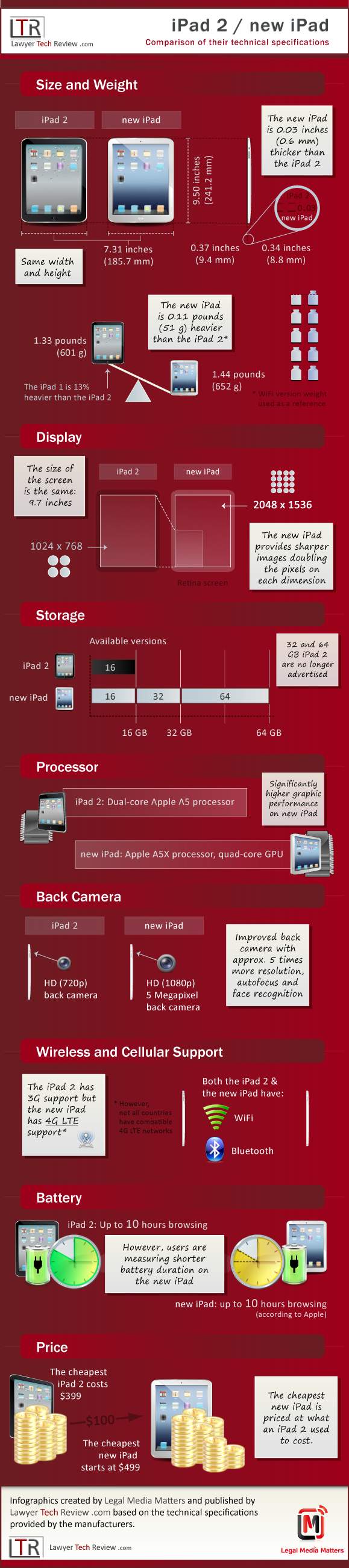
Compare: Apple iPad 2 Vs New iPad 3

According to a report published this week by Gartner Inc, worldwide sales of tablet computers are set to almost double to 118.9 million units this year, compared with 60 million units in 2011. The report predicts that Apple Inc will continue to dominate the tablet market, as the iPad looks to have a 61.4% share for 2012.

As our recent article ‘Lawyers using the iPad for business’ highlights, a growing number within the legal sector are continuing to adopt the iPad. As a result, the Legal Tech Review has created an interesting infographic that clearly highlights some of the key differences and technical specifications between the iPad 2 and the new iPad 3. The infogrpahic compares features including: size and weight, display, storage, processor, camera, wireless support, battery life and price.

Do you use the ipad for business? Will you be upgrading to the new iPad 3?

Source: Law Tech Review

Take a Look at Our Top Features

Lawyers Using iPad for Business

In a recent article entitled “2011 Legal Technology Survey Report” we discussed the American Bar Association’s annual report which revealed interesting information regarding the role of technology within the legal sector. The report identified that 20% of lawyers surveyed use a tablet device and of those, 96% identified the iPad as their brand of choice. So how are lawyers using the iPad for business?

Lawyers use of the ipad

Lawyers use of the ipad

Source: Law Tech Review

Discussing the significant growth of the iPad within the legal sector, the Lawyer Tech Review commented “the next time you go to court, don’t be surprised if you spot an iPad sitting next to the judge’s gavel”.  Due to its light weight and small size, tablet devices are particularly attractive to lawyers who often have to carry heavy folders, laptops and briefcases. According to LexBlog Inc, author and technology attorney Tom Mighell identified a number of benefits that the iPad has for the legal sector, these include: research, reading, note taking, use in meetings and in court.

In our article “Are Paperless Courts the Future for the Legal Sector?” we discussed a new scheme ‘Transforming through Technology’ which seeks to create paperless courts by replacing traditional bundles of paper with iPad style devices. Through this scheme files will be sent electronically and the tablet devices will then contain everything they need in court. Quinton Newcomb, a barrister from the south-eastern circuit of the Bar Council, told the guardian that “in theory this will mean that advocates will have access to everything that they need, apart from their wig and gown of course, all on a small digital device”.

Similarly Bundledocs users can use their iPad while in court, in a meeting – or anywhere. Bundledocs enables users to create an electronic document bundle that is fully ordered, indexed and paginated into a complete pdf document. With Bundledocs when users are out of the office they can use their iPad to easily view their document bundles or even send bundles to other parties. With the use of tablet devices, such as the iPad, lawyers can easily access their document bundles at any time, regardless of location.

How are you using your iPad for business?

Easily Create Electronic Bundles

SaaS Vs Traditional Software

Saas_Vs_Traditional_Software_Bundledocs.png

In a recent article we discussed the American Bar Associations 2011 Legal Technology Survey Report. Within the report it was revealed that when considering SaaS one of the main concerns for lawyers was “not being familiar with the software as a service technology”. As a result this article will seek to review the basics of SaaS and compare it to traditional software.

In order to discuss SaaS we will first review previous articles written on the subject.

1. It is important to note that the area of cloud computing can be divided into 3 areas. Product as a service (PaaS), infrastructure as a service (IaaS) and software as a service (SaaS). Visit our article entitled “Is Cloud Computing Right for you” to read about these different approaches. Alternatively, visit our “3 Approaches to Cloud Computing” video which gives a brief synopsis of the three approaches – in only 39 seconds.

2. In our article entitled “What is SaaS” we discussed the basics of software as a service technology including defining SaaS and examining how SaaS will affect the legal sector.

In order to further examine SaaS, we should consider the difference between SaaS and traditional software. In short, one of the key differences is SaaS is accessed over the internet rather than relying on traditional desktop software or traditional servers. NexFirm have created a point by point comparison which clearly displays some of the differences.

Source: NexFirm

Try Bundledocs For Free