Top 3 Hidden Features of Bundledocs PDF Binder - App Focus

In the latest edition of the American Bar Association's publication GPSOLO (for Solo, Small Firm and General Practices) Bundledocs was named as one of the key PDF binder tools that every lawyer should be using.  

How can Bundledocs electronic closing binder software help you? Our powerful PDF binder allows you to create, customize, print and securely share your electronic binder - from any location, from any device and at any time. Best of all, it is so simple and intuitive to use so you don't even need training to get started. 

Want to see it in action? Check out our '5 Steps to Create an Electronic Binder' today!

If you are a busy lawyer, attorney or barrister on the move then Bundledocs is the solution for you. With Bundledocs you can not only access but create complete bundles no matter where you are - meaning you are no longer tied to the office. 

That's not all. Bundledocs App has unique features that can help make the creation of PDF binders even easier. Let's take a look at the Top 3 Hidden Features of Bundledocs now. 

1. Expand/ Collapse All Sections

Easily expand or collapse all sections with the click of a button. This is great when producing large binders with multiple sections. 

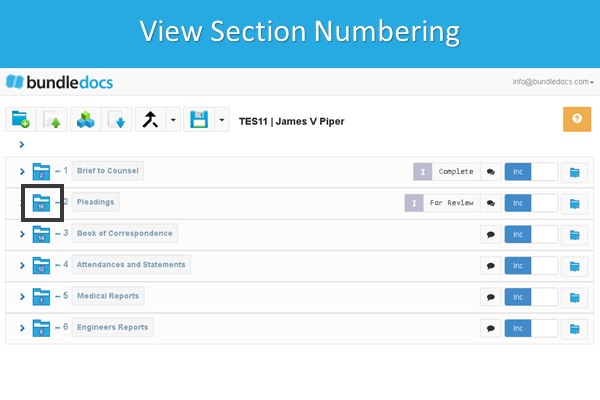
2. View Volume/Section Numbering

Bundledocs allows you quickly view section numbering at a glance. This is great when working with volumes as you can quickly and effortlessly see how many pages are currently contained within each volume/section. 
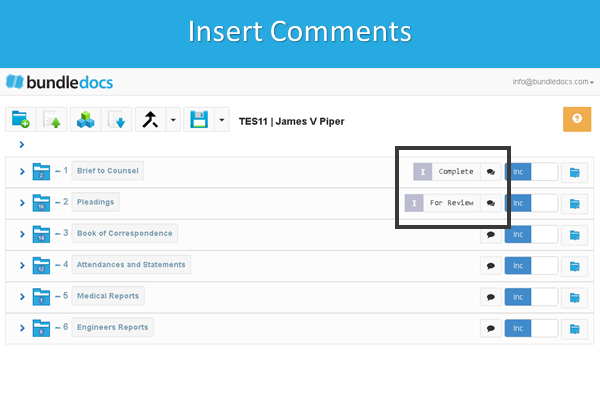
3. Effortlessly Insert Comments

Bundledocs offers a range of features to allow you to work collaboratively on your binder or bundles. Our latest release allows you easily view or apply comments to each section as you work. 

New to Bundledocs? We offer a free 30 Day Trial so try it today for free!

Try for Free & See

Create eBundles on your Smartphones or Tablet Device - App Focus

With over 14 years experience working in legal technology, the Bundledocs team know that producing ebundles - electronic bundles - can be a time consuming and laborious task. With Bundledocs that problem is a thing of the past. 

What does Bundledocs do? In short, it takes all your documents (emails, word documents, PDFs, images etc.) and combines them into a single PDF. It automatically creates an index that is hyperlinked, bookmarked and fully searchable. Its fully compliant and flexible so you can produce ebundles to suit court requirements. 

What's great about Bundledocs is that you can not only access but create complete ebundles from anywhere. This is great for any busy lawyer or legal professional on the move and means you are no longer tied to the office. 

Why choose Bundledocs App for all devices?

Intuitive Look & Feel

Bundledocs responsive design ensures you can work from your mobile, tablet, laptop or desktop and there is no difference in the look and feel. Effortlessly create ebundles from any device, from any location, at any time. 

No Learning Curve

Bundledocs is so simple and easy to use you don't even need training. Making the switch to the Bundledocs App? No need to worry, it works the same way as the Bundledocs you're used to. Check out our latest post to see the top 3 things you need to make the switch today!

Complete Feature Range

With Bundledocs App you can not only view/download completed bundles from any location - you can create complete bundles from scratch. Have access to your complete Bundledocs feature range and create professional ebundles on the move. Don't believe us? Sign up for a free trial today and put an end to your bundling worries.  


Free 30 Day Trial

Make the Switch to Bundledocs - App Focus

Did you know Bundledocs was recently named as one of the leading bundling tools for lawyers? Simple and intuitive to use, Bundledocs allows you to create, customize, print and securely share your electronic binder/bundle - from any location, from any device, at any time. 

New to Bundledocs? We offer a free 30 Day Trial so try it today for free!

Whether you are new to Bundledocs or a current user who has never taken a look at the Bundledocs App (for all devices) then you've come to the right place. No need to worry, it works exactly the same way as the Bundledocs you're used to. 

Let's take a look at the top 3 things you need to know to make the switch today! 

Access Bundledocs

Easily access Bundledocs by selecting the 'All Devices' option on the login screen. 

'All Devices' ensures you can work from your mobile, tablet, laptop or desktop and there is no difference in the look and feel. 


Preview Any Document

Did you know you can easily preview any document uploaded into Bundledocs? 

Simply click the icon - highlighted - and a preview window will immediately appear. 


Move Documents with Ease

Effortlessly move files in the order you want through dragging and dropping. 

All you need to do is select the file type icon, for example the PDF icon - as highlighted. Then drag into the correct position and drop. That's it! 

 
Take a Closer Look

Bundledocs - Leading PDF Bundling Tool for Lawyers

Bundledocs Leading PDF Bundling Tool For Lawyers

Bundledocs Leading PDF Bundling Tool For Lawyers

Maximize your practices efficiency with Bundledocs

In the latest edition of the American Bar Association's publication GPSOLO (for Solo, Small Firm and General Practices) Bundledocs was named as one of the key utiliities that every lawyer should be using. 

In the article Seth Rowland, founder of Basha Systems LLC highlighted the top cloud based document utilities available today that are helping lawyers become more productive. He noted that over the last 30 years law firms have seen significant change. With the rise of electronic document storage and the range of devices available including - laptops, tablets, smartphones - the lawyer of today is no longer tied to the office where their paper is stored. 

Check out the article in full :'Cloud-Based Document Utilities Every Lawyer Should Be Using'.

The article highlighted some of the core products that should be a part of every attorney's arsenal, including PDF bundling tool - Bundledocs. But how can Bundledocs help you?

Bundledocs PDF bundling tool allows you to create, customize, print and securely share your electronic binder/bundle. The best bit is it's so easy to use you don't even need training! 

Bundledocs takes your documents - whether these are PDF's, Microsoft Word documents, emails, images etc. and collates them into a single PDF bundle that is fully indexed with a table of contents, numbered/bates stamped, bookmarked and hyperlinked. 

Check out the top 10 reasons to choose Bundledocs and see why law firms of all sizes are choosing Bundledocs for all their bundling needs. Find out more today!

Try Bundledocs For Free

Top 5 things we learned from #bundledocsintegrations month

During the month of July, the Bundledocs team have been highlighting some of our unique integrations as part of #bundledocsintegrations month. 

To date Bundledocs have developed integrations with some of the world's leading systems. Even better, as Bundledocs is available as both a cloud and a on-premise (local) solution, it doesn't mater what system you use - Bundledocs can integrate with you. 

If you missed #bundledocsintegrations month, no need to worry. We have compiled the top 5 takeaways to help get you up to speed fast. 

1. Free Connector

Did you know all our integration connectors are available for free? Whether you are a litigant in person, medium sized practice or large government agency - Bundledocs integration connectors are available to you at no extra cost! 

2. New Partnerships Announced

Bundledocs announced our new partnerships with Google Plus and Windows Live.  Our latest integrations offer users quick and easy access to their Bundledocs account. Once connected you can sign in with just a single click!

3. Existing Partnerships Still Going Strong

With our powerful integrations (which are all available for free) you can seamlessly and effortlessly access and upload your files directly into Bundledocs. This can help save significant amounts of time, money and effort when preparing bundles. Check our our new #bundledocsintegrations month blog posts to find out the latest about our partners.

4. New Videos Released

During July, Bundledocs released a series of new videos highlighting our powerful partnerships and integrations. These include: Clio, Dropbox, Box, NetDocuments, Worldox and many more. Check out our videos - visit our YouTube channel today! 

5. Even More to Come

At Bundledocs we are continually developing new integrations. These integrations can help make the process of producing bundles even easier. Is your system integrated with Bundledocs? If not, get in touch with us today! 

Find Out More