Bundledocs eBundling Solution - G-Cloud 9 Approved Service Supplier

eBundling Solution Bundledocs Announce Acceptance to G-Cloud 9

Bundledocs is delighted to announce that our powerful ebundling solution has been accepted as an approved UK Government Digital Marketplace supplier under the G-Cloud 9 framework.  


What does this mean for local authorities? 

For those that are unaware, the G-Cloud framework is a UK Government initiative to help UK public sector bodies easily procure cloud solutions. So whether you are on the market for a Infrastructure as a Service (IaaS), Platform as a Service (PaaS), Software as a Service (SaaS) or even Specialist Cloud Services (SCS), then the Digital Marketplace is the place to go. 

For any local authorities looking to adopt an ebundling solution to help prepare electronic court and document bundles, then look no further than Bundledocs.  


What is Bundledocs eBundling Solution?

Bundledocs electronic document bundling software allows you to take a load of documents from your folder, case or document management system. Bundledocs organises them into a neat, sectioned booklet in minutes - ready to save, share or print. No matter how big or small, you can instantly change it in seconds. Simple, easy to use, time saving and massively efficient. There really is no reason not to choose Bundledocs.

Interested to see how it works? Arrange a Free Online Demonstration for your team today!


Why choose Bundledocs eBundling Solution?

Local Authorities and legal departments are already using Bundledocs efficiencies to set the standard and save costs. Let take a closer look at what Bundledocs has to offer...

Create Bundles in Minutes. Your bundle is automatically indexed, numbered, hyperlinked and bookmarked to the highest standard every time. If you forgot anything, don't worry. Bundledocs can re-organise the entire electronic bundle immediately.

Connect to your System. Effortlessly upload documents from your case or document management system. Bundledocs partners include solutions such as iManage, NetDocuments, Tikit TFB, Clio, Worldox... to name just a few.

Work Collaboratively with Others. Use Bundledocs to collaboratively work with colleagues, counsel, co-workers or any third party. Share your ebundle, keep copies of drafts, work together on the final bundle, all sorted for anytime access.

Access Anytime, Any Place, Any Device. With Bundledocs ebundling solution you are no longer tied to the office. Phone, tablet, laptop, desktop - whatever device you use, Bundledocs can be accessed from any location, at any time. 


To learn more about Bundledocs powerful ebundling solution and the G-Cloud framework, visit the Digital Marketplace today or check out our dedicated Bundledocs G-Cloud 9 Digital Marketplace listing for more about us and what we offer. 

Want a Free Online Demo?

Bundledocs Announce Exhibition at iManage ConnectLive 2017

Bundledocs is delighted to announce our attendance at iManage ConnectLive 2017

Following on from the success of ConnectLive 2016, this year's iManage event is shaping up to be bigger and better than ever...

The iManage ConnectLive 2017 user conference is all about creating connections. iManage will bring together CIOs, IT professionals, attorneys, legal administrators, partners and customers alike. So whether you are a current user or are simply looking for a solution to help address issues in your business, this is the event for you. 

Bundledocs are delighted to announce our attendance at ConnectLive 2017 London. Our team will be ready to demonstrate Bundledocs powerful capability as well as our seamless integration with iManage. 

Across the four days and two continents, ConnectLive 2017 will build on the successes of previous years and is expected to have between 1,000-1,200 attendees. Will you be one of them? 

Register today and meet Bundledocs at iManage ConnectLive 2017 which will take place on...


Date: Tue, June 27th - Wed, June 28th 2017    

Venue: InterContinental London - The O2

Stand: #6


The preliminary agenda and registration details are now available on the iManage ConnectLive 2017 website so head over and take a look for yourself. Any other questions? Get in touch with our team and we will be happy to assist. 

Find out More

How to Combine and Merge Files into One PDF Document - Feature Focus

Bundledocs allows you to effortlessly combine and merge any file you have uploaded into a single PDF document. This is great for anyone that wants to quickly combine files so it appears just how you want in the completed bundle. The best part? It can all be done directly from your web browser so there is no need to download any additional software!


How to combine and merge files into one PDF document

Step One: Upload

Securely upload your documents into Bundledocs. It can be a word document, PDF, images - whatever type of file you are working on. 

Step Two: Order

Select the files in the order in which you want them to appear. No need to drag and drop (although you can if you want!).

Step Three: Merge

When you are ready, all selected files will automatically appear in red and will be numbered in the order in which they will be merged. The final step is to simply select the 'Merge' button.

That's it! Once selected, Bundleocs will automatically combine and merge your files into a single PDF file. This is immediately available to download. Simply select the 'Edit Details' option (to the right of your newly merged document). From here you will be able to download your merged PDF document at once. Full details are covered in the manual, so access Bundledocs to learn more. 

Try for Free & See


Video: Merge Documents into One PDF

Check out our video to see how you can quickly and easily merge any document - whether it’s a word document, image, PDF, scan etc. - into a single PDF file.

Any questions? Get in touch with our team and they will be happy to help. Remember we offer a FREE 30-day trial too so you can test it out and see how it works for yourself. 

Give it a Go for Yourself - Free Trail

What's New at Bundledocs - April 2017

The Bundledocs team have been busy at work over the last few months. Want to find out what we've been up to? You've come to the right place. We have gathered our top 3 highlights, let's take a look...

Bundledocs Sponsor British Legal Technology Forum 2017

In March, Bundledocs showcased and sponsored the sell out British Legal Technology Forum 2017. Held in the Old Billingsgate London, the event was staged over two floors and brought together leading professionals from the legal and commercial technology sectors. During the event, the Bundledocs team had the opportunity to showcase what Bundledocs can do and even had a chance to catch-up with partners and customers alike. As the events only delegate bag sponsor, it was great to see so many Bundledocs Event Bags throughout the event... as well on the streets of London!

To find out more, check out our British Legal Technology Forum 2017 - Recap


New Integration Partnership Announced with iManage

Earlier this year, Bundledocs were delighted to announce a partnership and integration between our document bundling software and iManage, the leading provider of work product management solutions for legal accounting and financial service firms around the world. The latest partnership will allow legal professionals to easily prepare bundles, binders and briefs in minutes - not hours!

Check out our post 'Bundledocs Announce Partnership with iManage' to learn more.


Even More Features Released...

At Bundledocs we are continually developing new features and improving our current service offering. We are dedicated to providing our customers with a solution that helps take the hard work out of document bundling. Recently our development team have added even more collaborative features; created new integration connectors to leading solutions (as well as enhancing our current integration tools) and even added more options to further customise your bundle. It really has never been easier to create the perfect bundle!

Want to give it a try? Login to your account today!


Interested to learn more about Bundledocs? Get in touch with the Bundledocs team today. We offer free online demonstrations and free 30-day trials so don't waste any time. Get in touch today!

Learn More About Bundledocs

Securely Send the Index Page to Other Side Counsel - Training Tip

At Bundledocs, our team are dedicated to providing you with a solution to help you prepare bundles from beginning to end. One of the best parts of Bundledocs is it is incredibly simple and easy to use. So much so, at times you may not be aware that there is a range of powerful features and functionality available. 

I only want to send the index page to counsel - not the whole bundle. Is this possible in Bundledocs?
— New Bundledocs User

Recently our support team had an enquiry from a user that wanted to only send the complete index page (that is generated automatically within Bundledocs) to the other side counsel. Interested to see how this is done? Let's take a closer look...

1. Select the 'Generate' button. 

2. Expand the 'Section Pages' section.

3. Click the option 'Remove Section Index and Title Pages' and also select 'Generate without Documents'. By choosing these options you will hide all the documents of your bundle. If you have a multiple section bundle, selecting the 'Remove Section Index and Title Page' option will hide the index pages that appear at the beginning of each new section.

4. Select 'Generate'. Once complete, a preview window will automatically appear. Scroll through your index and review.


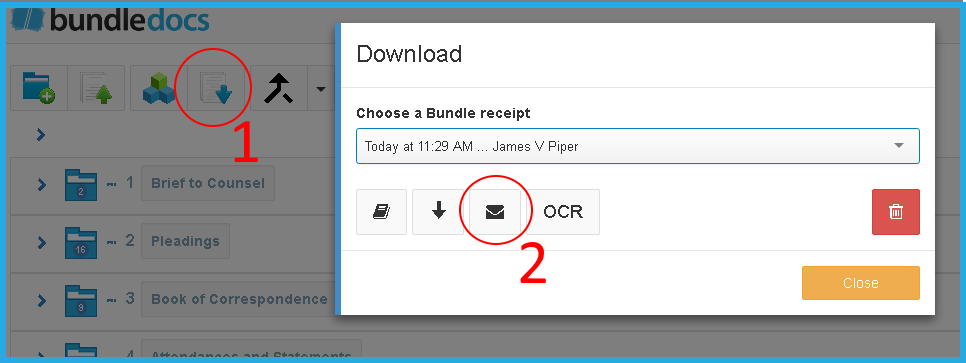
Did you know it is possible to securely send bundles to other side counsel, or any third party, directly within Bundledocs? It's simple. Take a look at how it's done...

1. Select 'Download'.

2. Make sure the correct bundle is selected. If not, just select the drop-down and choose your bundle. Once this is selected, click the envelope button, as highlighted above. From here you will be able to securely share your completed bundle (or index page) with others.


For more information about how to securely share bundles, make sure to download a copy of our Complete Training Manual. This is available to download for free, at any time, directly within your account.

Got a Question?